No Bot in Your Zoom Call: Daisy Records Everything on Your Mac
Daisy Review 2026: Local-First Mac Meeting Recorder With Whisper, Summaries, and MCP for Claude
Local Whisper transcription, your own AI key, and an MCP server Claude can query

The problem it solves
Pain Points / Context Tax
Daisy exists because meeting notes are broken in three ways at once: cloud notetakers that send a bot into Zoom (awkward, sometimes banned), manual note-taking that misses half the conversation, and AI summaries that require uploading sensitive audio to someone else's servers. Mac power users who live in Claude or Cursor want meeting memory inside their AI workflow — but most tools force a privacy tradeoff or a subscription treadmill. Daisy-4 targets operators who refuse to ship call audio to the cloud.
What Daisy Is
Daisy keeps the entire capture and transcription pipeline on your Mac. Record system audio + mic, transcribe locally with Whisper, then route summaries through the AI provider you already trust. It also ships push-to-talk dictation and a local MCP server — so Claude Desktop or Cursor can pull meeting context without you pasting transcripts. For the same audience that liked Minimi's on-device story, Daisy applies that philosophy to meetings and voice.
Pricing
Product Hunt launch indicates free options; open-source core with no mandatory subscription for local recording/transcription. Verify mydaisy.io for any paid tiers or hosted features added after launch.
Final Verdict
Daisy is the meeting-memory counterpart to Minimi's ambient-memory story: local-first, Claude-native, developer-friendly. The no-bot + Whisper + MCP combo is a strong 2026 pitch for a very specific audience — and that audience searches. At free/open-source launch, it is an easy recommend-to-try for Mac Claude users. Pair it mentally with Minimi: one tool for meetings, one for ambient Mac context.
What people are saying
Verbatim quotes from Product Hunt — not paraphrased by us.
“Daisy started as an internal tool. I do a lot of client interviews and discovery calls — design strategy work where the texture of what someone says matters as much as the substance — and for years my options were: send audio to Granola / Otter / Fathom and lose control of where the transcript lives, or type notes by hand and miss half the conversation. I'd rather not have to trust anyone.”
What Daisy Is
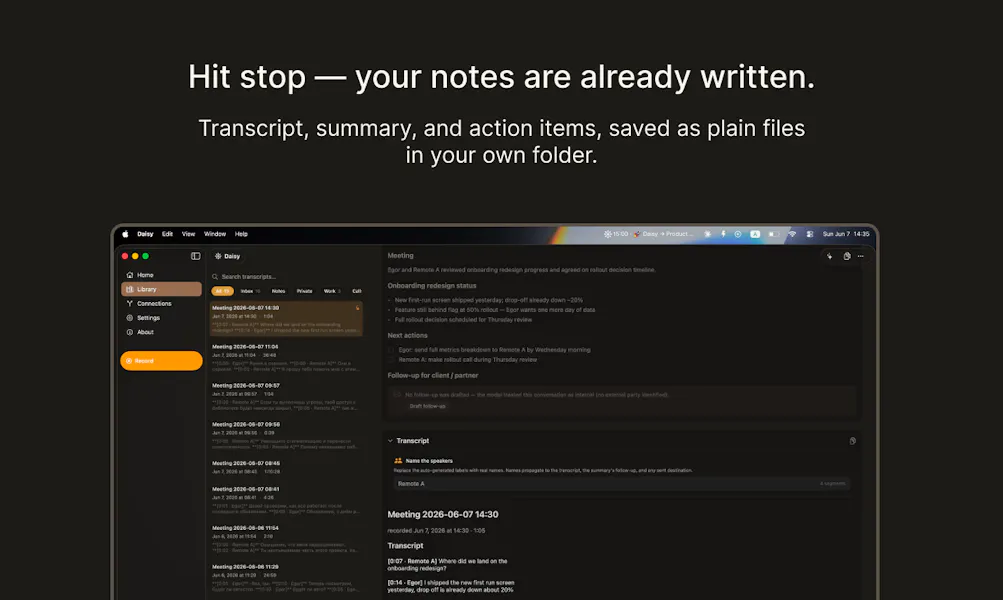
Daisy is an open-source Mac app that records calls on-device, transcribes with Whisper, summarizes with your AI, and exposes a local MCP server for Claude and Cursor. Honest review with privacy analysis.
See it in action
Screenshots and launch media from the official Product Hunt listing.



How It Works
- 1Download Daisy for Mac from mydaisy.io (open source — inspect the code if you want).
- 2Grant macOS permissions for microphone and system audio capture.
- 3Start a recording during a call — no bot joins the meeting room.
- 4Whisper runs on-device to transcribe; pick your summarization provider (Anthropic, OpenAI, Apple Intelligence).
- 5Query past meetings via the local MCP server from Claude or Cursor, or use push-to-talk dictation in any app.
Real-World Use Cases
Client call follow-up
Engineering standup memory
Research interviews
Dictation in any app
Privacy & Technical Details
- Local-first by design: recording + Whisper transcription on Mac; positioning is "nothing leaves your Mac" for core capture.
- Summaries use your configured AI provider — understand that provider's policy when you send text out for summarization.
- Open source (Apache 2.0) — auditable, forkable, no vendor lock-in for the recorder itself.
- Local MCP server for Claude/Cursor — meeting queries stay in your dev environment, not a third-party memory cloud.
- Caveat: summarization step may hit cloud APIs depending on provider; tune settings if you need air-gapped workflows.
Pricing
Product Hunt launch indicates free options; open-source core with no mandatory subscription for local recording/transcription. Verify mydaisy.io for any paid tiers or hosted features added after launch.
Honest Pros & Cons
Pros
- • No meeting bot — reduces friction and policy issues on client calls.
- • On-device Whisper transcription aligns with 2026 privacy expectations.
- • MCP integration is a force multiplier for Claude/Cursor users (same buyer persona as Minimi).
- • Open source builds trust and community velocity.
- • Early PH reviews positive (5.0 at launch) — social proof for a new tool.
Cons
- • Mac-only — Windows/Linux users are out.
- • Summarization still depends on external AI APIs unless you use Apple Intelligence locally.
- • Competes with a crowded notetaker space — differentiation is privacy + MCP, not brand awareness.
- • Name collision: many unrelated "Daisy" products — search carefully for "Daisy mydaisy.io" or "Daisy Mac MCP".
- • Young launch — enterprise admin controls and team features may be limited.
Comparison Table
| aspect | daisy | native | rewind | manual |
|---|---|---|---|---|
| Meeting join model | No bot — local system audio capture | N/A (manual notes) | Continuous screen/audio logging | Human notes during call |
| Privacy | Local record + local Whisper; optional cloud summary | User-controlled | Often cloud-backed | Fully user-controlled |
| Claude/Cursor fit | Local MCP server for meeting queries | Paste transcripts manually | Separate search UX | Copy/paste from notes app |
| Best for | Mac users in Claude/Cursor who hate meeting bots | Light meeting volume | Broad personal recall | Short calls, high attention |
Who Should Use Daisy
Mac-based knowledge workers, consultants, and developers already using Claude or Cursor who want meeting memory without Otter/Fireflies-style bots. Privacy-conscious users who like open source and on-device transcription. Teams small enough that local workflows beat enterprise notetaker procurement.
Who Should Skip
Windows-first organizations. Users who need guaranteed cloud backup and admin dashboards day one. People who rarely take calls and do not use Claude/Cursor — the MCP advantage will not matter.
Our take
Worth testing
Daisy is the meeting-memory counterpart to Minimi's ambient-memory story: local-first, Claude-native, developer-friendly. The no-bot + Whisper + MCP combo is a strong 2026 pitch for a very specific audience — and that audience searches. At free/open-source launch, it is an easy recommend-to-try for Mac Claude users. Pair it mentally with Minimi: one tool for meetings, one for ambient Mac context.
Current status: no tracked affiliate for Daisy. This review is independent and not sponsored. We update this as programs become available (PartnerStack, Impact, etc).