NeuralAgent 3.0: Giving Your Computer a Lightning-Fast AI Brain for Desktop and Web Tasks
NeuralAgent 3.0 Review 2026: AI Desktop Automation at Lightning Speed
NeuralAgent 3.0 automates repetitive UI tasks on your computer with remarkable speed and AI intelligence, learning from your actions or commands.

The problem it solves
Pain Points / Context Tax
Many individuals and businesses struggle with repetitive, time-consuming UI tasks that involve clicking, typing, and navigating across various desktop applications and web browsers. Traditional automation tools often require complex scripting or are limited to specific environments, making it difficult to streamline cross-application workflows. This leads to reduced productivity, increased human error, and a significant drain on valuable time. NeuralAgent 3.0 directly addresses this by providing an intuitive, AI-driven solution.
What NeuralAgent 3.0 Is
NeuralAgent 3.0 offers a comprehensive solution by enabling AI to directly interact with your computer's UI. It observes your screen, controls the mouse and keyboard, and can learn from your actions to create "Fast Replays" for repeatable tasks. Users can initiate workflows via natural language (text or voice) or by recalling saved automations. The tool intelligently routes tasks to different AI models—including a "Fast model" for rapid execution and an "Advanced model" for complex reasoning and recovery—ensuring both speed and reliability. NeuralAgent 3.0 extends its utility to enterprise environments with cloud computer deployment and centralized management.
Pricing
NeuralAgent 3.0 offers a tiered pricing structure, starting with a 7-day free trial that includes 10 runs without requiring a credit card. The "Pro" plan is available for $49/month when billed annually ($59/month monthly), providing 100 runs and 10 Replays for a single user. For small teams, the "Team" plan costs $99/month annually ($119/month monthly), offering 250 runs, 25 Replays, and support for 3 users, alongside team management features. Larger organizations can opt for the "Enterprise" plan, which features custom pricing and includes unlimited runs, unlimited Replays, unlimited users, cloud computers, and dedicated support. All paid plans include core features like Desktop + Web Automation, Watch & Learn, and AI Supervision.
Final Verdict
NeuralAgent 3.0 presents a compelling vision for the future of desktop and web automation, delivering on its promise of lightning-fast UI execution. Its blend of natural language interaction, "Watch & Learn" capabilities, and intelligent AI supervision makes it a powerful tool for streamlining repetitive tasks. While performance can vary and the pricing model requires consideration for high-volume users, NeuralAgent 3.0's ability to learn from human actions and execute with remarkable speed positions it as a significant productivity enhancer for a wide range of users, from individuals to large enterprises. It effectively bridges the gap between complex RPA tools and simple macros, offering an accessible yet robust AI agent experience.
What people are saying
Verbatim quotes from Product Hunt — not paraphrased by us.
“This is a game changer for anyone looking to automate repetitive tasks on their computer. The ability to use both text and voice commands, along with the "Watch & Learn" feature, makes it incredibly intuitive and powerful. The speed of execution (285ms!) is truly impressive. Can't wait to see how this evolves!”
“This is an incredible product! The ability to automate tasks across desktop and web applications with such speed and accuracy is a game-changer. The "Watch & Learn" feature is particularly impressive, making it easy to create custom workflows. Definitely a must-have for anyone looking to boost their productivity.”
“I've been following NeuralAgent for a while now, and this 3.0 release is truly next level. The focus on speed and reliability for UI automation is exactly what's needed. The enterprise features also show a clear vision for scalability. Congrats to the team!”
What NeuralAgent 3.0 Is
NeuralAgent 3.0 automates UI actions on your computer with AI, offering fast execution, Watch & Learn, and enterprise features. Review its pros, cons, and pricing.
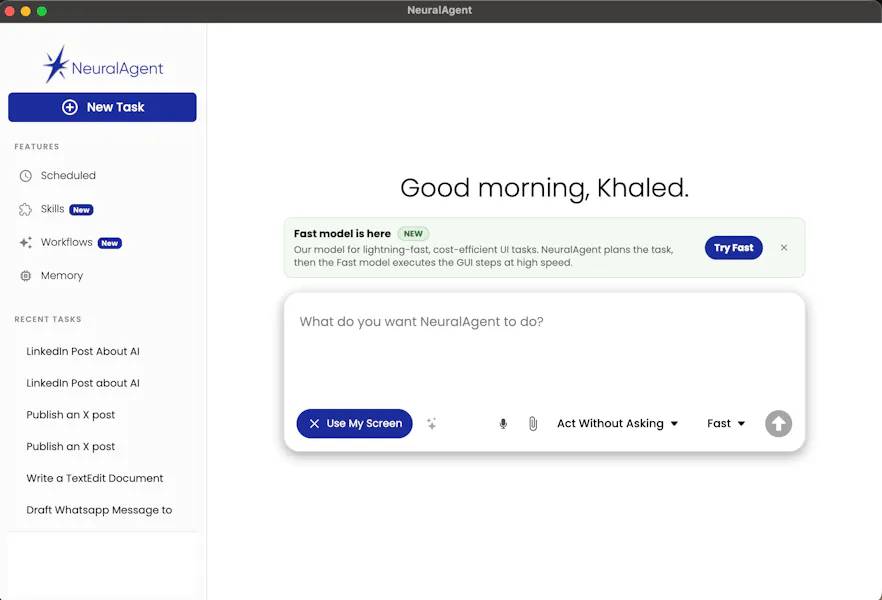
See it in action
Screenshots and launch media from the official Product Hunt listing.



How It Works
- 1Users provide instructions via text, voice, or by referencing a saved workflow.
- 2NeuralAgent 3.0 interprets the request, breaks it down into an executable plan, and determines the appropriate AI model for each step (Standard, Advanced, Fast, or Supervised).
- 3The AI agent interacts with the computer's interface, seeing the screen, moving the mouse, clicking, typing, and scrolling across desktop and web applications. The "Fast model" is engaged for rapid, routine UI actions.
- 4NeuralAgent 3.0 continuously monitors execution. If the interface changes or an action fails, the reasoning model can intervene to recover or replan the task.
- 5Users can activate "Watch & Learn" mode to demonstrate a task. NeuralAgent 3.0 records these actions and can save successful executions as "Fast Replays" for future, lightning-fast automation.
- 6For enterprise users, workflows can be deployed across provisioned cloud computers and scheduled for unattended operation via a central dashboard.
Real-World Use Cases
Data Entry Automation
E-commerce Product Management
Sales Prospect Research
Personal Workflow Automation
Privacy & Technical Details
- NeuralAgent 3.0 operates by directly interacting with your computer's UI, similar to how a human user would.
- The official site includes a 'Security' page, indicating attention to data protection and operational integrity.
- It supports both desktop and web applications, implying a broad scope of interaction.
- Enterprise features include cloud computer deployment and centralized management, which suggests robust infrastructure and access controls for business environments.
- The 'Ask First' feature allows users to confirm sensitive actions, providing a layer of human oversight.
Pricing
Verified June 26, 2026NeuralAgent 3.0 offers a tiered pricing structure, starting with a 7-day free trial that includes 10 runs without requiring a credit card. The "Pro" plan is available for $49/month when billed annually ($59/month monthly), providing 100 runs and 10 Replays for a single user. For small teams, the "Team" plan costs $99/month annually ($119/month monthly), offering 250 runs, 25 Replays, and support for 3 users, alongside team management features. Larger organizations can opt for the "Enterprise" plan, which features custom pricing and includes unlimited runs, unlimited Replays, unlimited users, cloud computers, and dedicated support. All paid plans include core features like Desktop + Web Automation, Watch & Learn, and AI Supervision.
Official pricing pageHonest Pros & Cons
Pros
- • Exceptional Speed: The "Fast model" executes UI actions in approximately 285ms, significantly accelerating repetitive tasks.
- • Versatile Automation: Automates across both desktop applications and web browsers, offering broad utility.
- • Intuitive Learning: "Watch & Learn" feature allows users to easily create automations by demonstrating tasks.
- • Natural Language Interface: Supports text and voice commands for initiating and managing workflows.
- • AI Supervision & Recovery: Intelligent routing and monitoring ensure reliability, with AI stepping in to recover from unexpected interface changes.
- • Enterprise Scalability: Offers cloud computer deployment, centralized management, and advanced features for large organizations.
- • Reusable Workflows: "Fast Replays" enable quick, repeatable execution of previously learned tasks.
Cons
- • Performance Variability: While fast, the website notes performance can vary by task, application, system, network, and interface state.
- • Potential Learning Curve: While intuitive, mastering complex automations and leveraging all features might require some initial effort.
- • Reliance on UI Stability: Changes in application UI or website layouts could potentially break recorded "Replays," requiring re-learning or adjustments.
- • Cost for High Volume: The run-based pricing model might become expensive for users with very high automation volumes outside of the Enterprise tier.
- • Security Considerations: As an agent that controls your computer, users must trust the software implicitly, though a security page is provided.
Comparison Table
| aspect | neuralagent | native | rewind | manual |
|---|---|---|---|---|
| Execution Speed | Lightning-fast (~285ms for some UI actions) | Instant (shortcuts) to moderate (simple extensions) | Variable, often slower than NeuralAgent's Fast model | Human speed (slowest) |
| Learning/Setup | Watch & Learn, Text/Voice prompts, AI-driven | Manual configuration, rule-based | Manual recording, script-based, often complex | Human observation and memory |
| Scope of Automation | Desktop & Web applications, cross-application | Limited to specific apps or browser functions | Primarily desktop, some web via specific connectors | Any application or task |
| Supervision & Recovery | AI-supervised monitoring, intelligent recovery, replanning | None, fails on unexpected changes | Rule-based error handling, requires explicit setup | Human judgment and adaptation |
| Flexibility | Adapts to some UI changes, natural language input | Rigid, breaks easily with UI changes | Can be flexible with advanced scripting, but less intuitive | Highly flexible, human adaptability |
| Ease of Use | High (especially Watch & Learn, natural language) | Moderate (for setup), high (for execution) | Moderate to high (requires technical understanding) | High (natural human interaction) |
Who Should Use NeuralAgent 3.0
NeuralAgent 3.0 is ideal for individuals, small teams, and enterprises burdened by repetitive, high-volume UI tasks across desktop and web applications. It's particularly beneficial for roles in back-office operations, sales & CRM, e-commerce, and personal productivity where efficiency gains from automating data entry, report generation, and system updates are critical. Teams looking for a user-friendly, AI-powered solution that can learn from demonstrations and execute tasks at speed will find significant value.
Who Should Skip
Users who rarely perform repetitive computer tasks or whose workflows are highly unique and non-standardized may not fully leverage NeuralAgent 3.0's capabilities. Those with extremely sensitive data handling requirements who are uncomfortable with an AI agent controlling their computer, despite security assurances, might also hesitate. Additionally, individuals on a very tight budget for automation might find the run-based pricing for higher volumes a consideration, though the free trial offers a good starting point.
Our take
Worth testing
NeuralAgent 3.0 presents a compelling vision for the future of desktop and web automation, delivering on its promise of lightning-fast UI execution. Its blend of natural language interaction, "Watch & Learn" capabilities, and intelligent AI supervision makes it a powerful tool for streamlining repetitive tasks. While performance can vary and the pricing model requires consideration for high-volume users, NeuralAgent 3.0's ability to learn from human actions and execute with remarkable speed positions it as a significant productivity enhancer for a wide range of users, from individuals to large enterprises. It effectively bridges the gap between complex RPA tools and simple macros, offering an accessible yet robust AI agent experience.
Current status: no tracked affiliate for NeuralAgent 3.0. This review is independent and not sponsored. We update this as programs become available (PartnerStack, Impact, etc).