Quartz: Bringing Local AI and Laser Focus to Your Mac Email Inbox
Quartz Review 2026: The Privacy-First AI Email Client for Mac
Quartz is an AI-powered email client for Mac that prioritizes privacy and focus by processing all AI tasks locally on your device.

The problem it solves
Pain Points / Context Tax
Many modern email workflows are plagued by constant distractions, an overwhelming influx of messages, and growing concerns about data privacy when using AI tools. Traditional email clients often lack advanced AI capabilities, while cloud-based AI solutions demand users upload their sensitive communications to external servers. This creates a dilemma for professionals who want the benefits of AI productivity without sacrificing the security of their inbox. Quartz directly addresses this by offering a robust AI email client that keeps all processing on your local Mac.
What Quartz Is
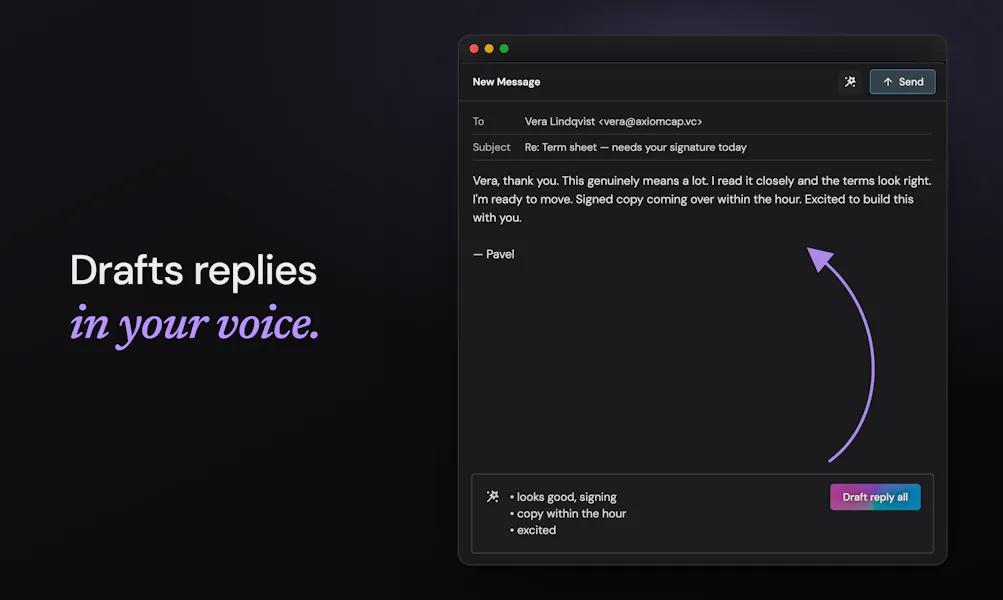
Quartz provides a compelling solution by integrating AI directly into your email client, but with a critical difference: all AI processing occurs locally on your Mac. This means you can leverage AI for tasks like summarizing long threads, quickly triaging your inbox, and drafting responses without your data ever being sent to third-party cloud servers. The client is built for focus, featuring a minimal UI and smart notifications to help users maintain concentration. By combining advanced AI with a strong commitment to local data processing, Quartz offers a secure and efficient way to manage email, transforming a potentially chaotic inbox into a more organized and productive space.
Pricing
Quartz is currently in private beta, and pricing details have not been publicly announced. The official website states that pricing will be revealed closer to its public launch. Users can sign up for early access to be notified of updates.
Final Verdict
Quartz stands out in the crowded email client market by uniquely combining powerful AI capabilities with an unwavering commitment to user privacy through local processing. Its Mac-native design promises speed and a focused experience, addressing common pain points of email overload and data security concerns. While currently in private beta and with unknown pricing, its core value proposition of 'AI email, on your Mac, for your eyes only' is highly compelling. For Mac users eager to embrace AI for email without sacrificing privacy, Quartz represents a significant step forward, offering a glimpse into a more secure and productive future for managing our digital correspondence.
What people are saying
Verbatim quotes from Product Hunt — not paraphrased by us.
“This is awesome! I've been looking for an AI email client that respects privacy. The local-first approach is a huge differentiator. Can't wait to try it out!”
“This looks great! I'm always looking for ways to streamline my email workflow and the local AI processing is a huge plus for privacy. Congrats on the launch!”
“Thank you for the kind words! We're thrilled to bring Quartz to the world and help people take back control of their inboxes. We believe privacy and powerful AI can go hand-in-hand.”
What Quartz Is
Quartz is an AI email client for Mac focused on privacy and productivity. It offers local AI for summaries, drafts, and triage, keeping your data secure.
See it in action
Screenshots and launch media from the official Product Hunt listing.


How It Works
- 1Install the Quartz application on your Mac.
- 2Connect your email accounts (supports multiple providers).
- 3Quartz indexes your emails locally on your device.
- 4AI models, also running locally, analyze your emails for summarization, triage, and drafting assistance.
- 5Interact with AI features directly within the client, knowing your data remains on your Mac.
Real-World Use Cases
Quickly Grasp Long Email Threads
Drafting Professional Responses
Efficient Inbox Triage
Maintaining Privacy with AI
Privacy & Technical Details
- Local-first AI processing: All AI computations for summarization, drafting, and triage happen directly on your Mac, ensuring data never leaves your device.
- Privacy-focused design: Explicitly built to keep user data secure and private.
- Offline functionality: Operates even without an internet connection for core email management and local AI tasks.
- Mac-native application: Optimized for macOS performance and integration.
Pricing
Quartz is currently in private beta, and pricing details have not been publicly announced. The official website states that pricing will be revealed closer to its public launch. Users can sign up for early access to be notified of updates.
Honest Pros & Cons
Pros
- • Unparalleled privacy: All AI processing is local, keeping your sensitive email data on your Mac.
- • Enhanced focus: Designed with a minimal interface and smart notifications to reduce distractions.
- • AI-powered productivity: Offers intelligent summarization, triage, and drafting assistance.
- • Speed and responsiveness: Built from the ground up for fast performance on macOS.
- • Offline capability: Functions without an internet connection, ideal for travel or unreliable networks.
- • Supports multiple email accounts.
Cons
- • Mac-only: Excludes users on Windows, Linux, or mobile platforms.
- • Currently in private beta: Not yet widely available to the public.
- • Pricing is unknown: Potential users cannot evaluate cost-effectiveness yet.
- • AI capabilities might be limited by local hardware: Performance could vary depending on the user's Mac specifications.
- • New product: May lack some advanced features or integrations found in more mature email clients.
Comparison Table
| aspect | native | rewind | manual | quartz |
|---|---|---|---|---|
| AI Processing Location | Typically none (e.g., Apple Mail) | Local (on your Mac) | None | Local (on your Mac) |
| Privacy & Data Security | High (standard email client security) | High (data stays on device) | Highest (no AI involvement) | High (data stays on device) |
| AI Features | Limited to none | Transcript search, summary of all activities | None | Summarization, drafting, triage |
| Platform Availability | Mac, iOS (Apple Mail) | Mac only | Any platform with email access | Mac only |
| Focus & UI | Standard, can be cluttered | Background recording, separate UI for review | Depends on client, often cluttered | Minimalist, distraction-free |
Who Should Use Quartz
Quartz is ideal for Mac users who prioritize privacy and are seeking an AI-powered email client that keeps their data local. It's perfect for professionals handling sensitive information, those overwhelmed by email volume, or anyone looking to enhance their email productivity without compromising security. If you value a focused, fast, and secure email experience with intelligent assistance, Quartz is worth considering for early access.
Who Should Skip
Users who are not on a Mac will need to skip Quartz, as it's an exclusive macOS application. Those who require a cloud-based email solution for cross-device synchronization or team collaboration features might find its local-first approach limiting. Additionally, users on older Macs with less powerful processors might experience slower AI performance. If you need a free solution or are comfortable with existing cloud AI email tools, Quartz might not be for you.
Our take
Worth testing
Quartz stands out in the crowded email client market by uniquely combining powerful AI capabilities with an unwavering commitment to user privacy through local processing. Its Mac-native design promises speed and a focused experience, addressing common pain points of email overload and data security concerns. While currently in private beta and with unknown pricing, its core value proposition of 'AI email, on your Mac, for your eyes only' is highly compelling. For Mac users eager to embrace AI for email without sacrificing privacy, Quartz represents a significant step forward, offering a glimpse into a more secure and productive future for managing our digital correspondence.
Current status: no tracked affiliate for Quartz. This review is independent and not sponsored. We update this as programs become available (PartnerStack, Impact, etc).