Slashspace AI: Orchestrating Complex AI Workflows on an Infinite Canvas
Slashspace AI Review 2026: The Canvas-First Approach to AI Workflows
Slashspace AI offers a unique canvas-first approach to manage multiple AI interactions and sustained, complex projects, moving beyond single-chat experiences.

The problem it solves
Pain Points / Context Tax
For many AI-native users, the current workflow is fragmented: copy-pasting prompts and responses across numerous single-purpose AI chat applications. This constant context switching and lack of persistent memory between interactions makes any meaningful, sustained, or complex work incredibly inefficient. Every new chat box effectively 'collapses context to zero,' forcing users to re-establish parameters and background information repeatedly. This broken experience hinders productivity and the ability to leverage AI for deeper, multi-faceted projects. Slashspace AI directly addresses this fundamental challenge.
What Slashspace AI Is
Slashspace AI solves the fragmented AI workflow by providing an infinite canvas where AI agents live and interact. Instead of isolated chat boxes, users can run many chats as 'nodes' on this canvas. This canvas becomes the central context space, allowing all connected agents to 'see each other' and share information seamlessly. This persistent, visual context enables users to manage complex projects, iterate on ideas, and conduct sustained research without losing track of previous interactions or having to manually transfer data. Slashspace AI transforms a disjointed process into a cohesive, visual workflow.
Pricing
Pricing for Slashspace AI is not publicly listed on their official website. The tool appears to be in an early access phase, with users encouraged to join a waitlist. Potential users should expect to inquire directly for pricing details or await a public launch with defined tiers.
Final Verdict
Slashspace AI represents a significant evolution in how we interact with AI for complex work. By shifting from isolated chat boxes to an interconnected visual canvas, it addresses the critical pain point of context loss and fragmented workflows. While it demands a new way of thinking about AI interaction and its pricing remains undisclosed, its potential to streamline sustained, multi-agent projects is substantial. For professionals drowning in AI copy-pasting, Slashspace AI offers a compelling, people-first solution to reclaim efficiency and deepen AI integration.
What people are saying
Verbatim quotes from Product Hunt — not paraphrased by us.
“After years of being a designer and developer, AI came into my life and changed everything. It gave me the confidence to go after my most ambitious products. But chat boxes and fragmented contexts across many apps aren't built for complex work. As a founder, developer, and marketer, I'm a generalist. I work on many things that don't fit into single sessions. I needed a new kind of interface that works along with my brain, not against it. Slashspace is a canvas-first interface for AI. It's a desktop app that stores everything locally. For each complex problem, you create a new space. Add all yo”
What Slashspace AI Is
Explore Slashspace AI, a canvas-first platform designed for sustained, complex AI work. This review covers its features, use cases, and who benefits most.
See it in action
Screenshots and launch media from the official Product Hunt listing.
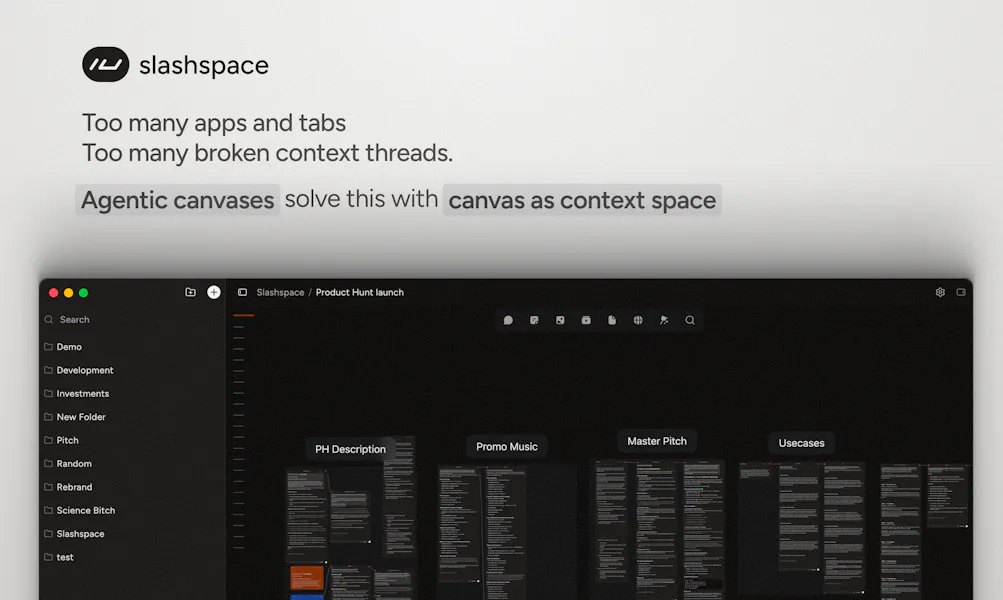


How It Works
- 1Start a new project on the Slashspace AI canvas, which serves as your persistent workspace.
- 2Add multiple AI 'nodes' to the canvas, each representing an individual AI chat or agent.
- 3Interact with each AI node independently or connect them to share context and information.
- 4Organize and arrange nodes visually to reflect your workflow or project structure.
- 5The canvas maintains the full context of all interactions, allowing AI agents to build upon previous responses.
- 6Save your canvas as a file directly on your computer, ensuring data ownership and offline access.
Real-World Use Cases
Complex Research & Synthesis
Software Development & Debugging
Content Creation & Iteration
Privacy & Technical Details
- Canvas files are stored locally on your computer, offering a degree of data ownership and control.
- The architecture emphasizes a 'canvas-first' approach, suggesting a visual, interactive interface.
- Built with input from 1600 power users over 1.5 years, indicating a focus on robust functionality and user experience.
Pricing
Verified June 13, 2026Pricing for Slashspace AI is not publicly listed on their official website. The tool appears to be in an early access phase, with users encouraged to join a waitlist. Potential users should expect to inquire directly for pricing details or await a public launch with defined tiers.
Official pricing pageHonest Pros & Cons
Pros
- • Breaks free from the limitations of single-chat AI interfaces, enabling complex, multi-agent workflows.
- • Maintains persistent context across multiple AI interactions, reducing repetitive prompting.
- • Visual canvas provides an intuitive way to organize, connect, and manage diverse AI tasks.
- • Local file storage of canvases enhances data privacy and user control.
- • Designed for 'sustained, complex work,' catering to professionals needing deep AI integration.
- • Matured through extensive user feedback over 1.5 years, suggesting a refined user experience.
Cons
- • Requires a shift in workflow from traditional linear chat, which might have a learning curve.
- • Pricing information is not publicly available, making it difficult for potential users to assess cost-effectiveness.
- • As a specialized tool, it might be overkill for simple, one-off AI tasks.
- • Reliance on local file storage might complicate collaboration for teams unless specific sharing features are implemented.
- • The 'canvas-first' approach, while powerful, might not appeal to users who prefer minimalist interfaces.
Comparison Table
| aspect | native | rewind | manual | slashspace |
|---|---|---|---|---|
| Workflow Management | Single-chat, linear, limited context per session | Linear history, no multi-agent interaction | Copy-pasting between apps, high context loss | Visual, canvas-based, multi-agent, persistent context |
| Context Handling | Context limited to current chat session, resets frequently | Recalls past interactions, but not for multi-agent use | User manually maintains context, prone to errors | Shared context across all canvas nodes, AI agents 'see each other' |
| Data Storage | Cloud-based, tied to service provider | Local recording of screen/audio | Scattered across various documents/apps | Local files on user's computer |
| Complexity Handling | Best for simple, isolated queries or tasks | Captures complex interactions, but doesn't manage them | Extremely difficult to manage complex projects efficiently | Designed for sustained, complex, multi-faceted projects |
Who Should Use Slashspace AI
Slashspace AI is ideal for researchers, developers, content creators, and strategists who regularly engage in complex, multi-stage projects requiring diverse AI interactions. If your current AI workflow involves constant copy-pasting between different AI tools and you struggle with maintaining context across tasks, Slashspace AI offers a powerful solution. It's particularly suited for power users looking to orchestrate multiple AI agents in a coherent, visual workspace and value local data storage.
Who Should Skip
Users who primarily need AI for quick, single-query tasks or simple content generation might find Slashspace AI's canvas-first approach overly complex. If you prefer minimalist interfaces, are not involved in sustained, multi-faceted projects, or are unwilling to adapt to a new visual workflow paradigm, this tool might not be the best fit. Those requiring immediate, transparent pricing information may also want to wait until Slashspace AI publicly releases its pricing structure.
Our take
Worth testing
Slashspace AI represents a significant evolution in how we interact with AI for complex work. By shifting from isolated chat boxes to an interconnected visual canvas, it addresses the critical pain point of context loss and fragmented workflows. While it demands a new way of thinking about AI interaction and its pricing remains undisclosed, its potential to streamline sustained, multi-agent projects is substantial. For professionals drowning in AI copy-pasting, Slashspace AI offers a compelling, people-first solution to reclaim efficiency and deepen AI integration.
Current status: no tracked affiliate for Slashspace AI. This review is independent and not sponsored. We update this as programs become available (PartnerStack, Impact, etc).